API with SSL Cert on IIS

0

Category : ,

Steps involved in getting an API up-and-running on IIS7

IIS non-secure

  1. Host WCF Service on IIS
  2. Add web site on IIS
  3. Change AppPool on IIS to correct .Net framework
  4. Add DNS record to point test.URL to IP
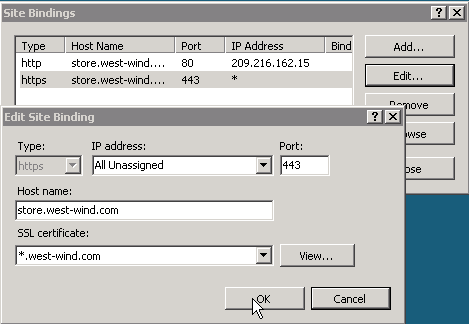
  5. Update IIs bindings to link Host Name and port number to new url test.URL

Generate self-signed SSL Cert

There can only be 1 ssl cert per IP address so we need to use a wildcard cert that can be applied to multiple urls.

Link cert to site

Add additional binding to site on IIS, this will be for https and the self-signed cert name will need to start with a * to ensure we can enter a Hostname and that multiple sites can use the same self-signed cert on the server.

Updating the WCF web.config to handle https requests

Change the behaviorConfiguration to https and also the bindingConfiguration needs to be updated to the below


Testing Https with Postman

Exception for self-signed needs to be made in postman, instructions for mac and windows can be found for Postman here:
Sending requests to URLs with self signed SSLs
Using self-signed SSL certificates with Postman
Using self-signed SSL certificates with the Postman App, you just need to go to the settings and turn off the SSL cert verification. here

Postman Intro

1

Category : , ,

Postman is an app that we use for testing during our API development. Basically sending requests to our API dev project to test responses and functionality.

Postman docs are available here: Postman Docs

The docs also contain a couple of videos to get you up-and-running and there is a youtube channel: Postman How-to Series

Basic Usage

You can send most request method types using Postman, including Query string params, request body info, headers containing authentication info and retrieve/view responses in any format, we predominantly worked with JSON on our API. You can also work with cookies but we have not used this yet.

Extracting data from responses and chaining requests

You can extract data from response and chain requests using test scripts.

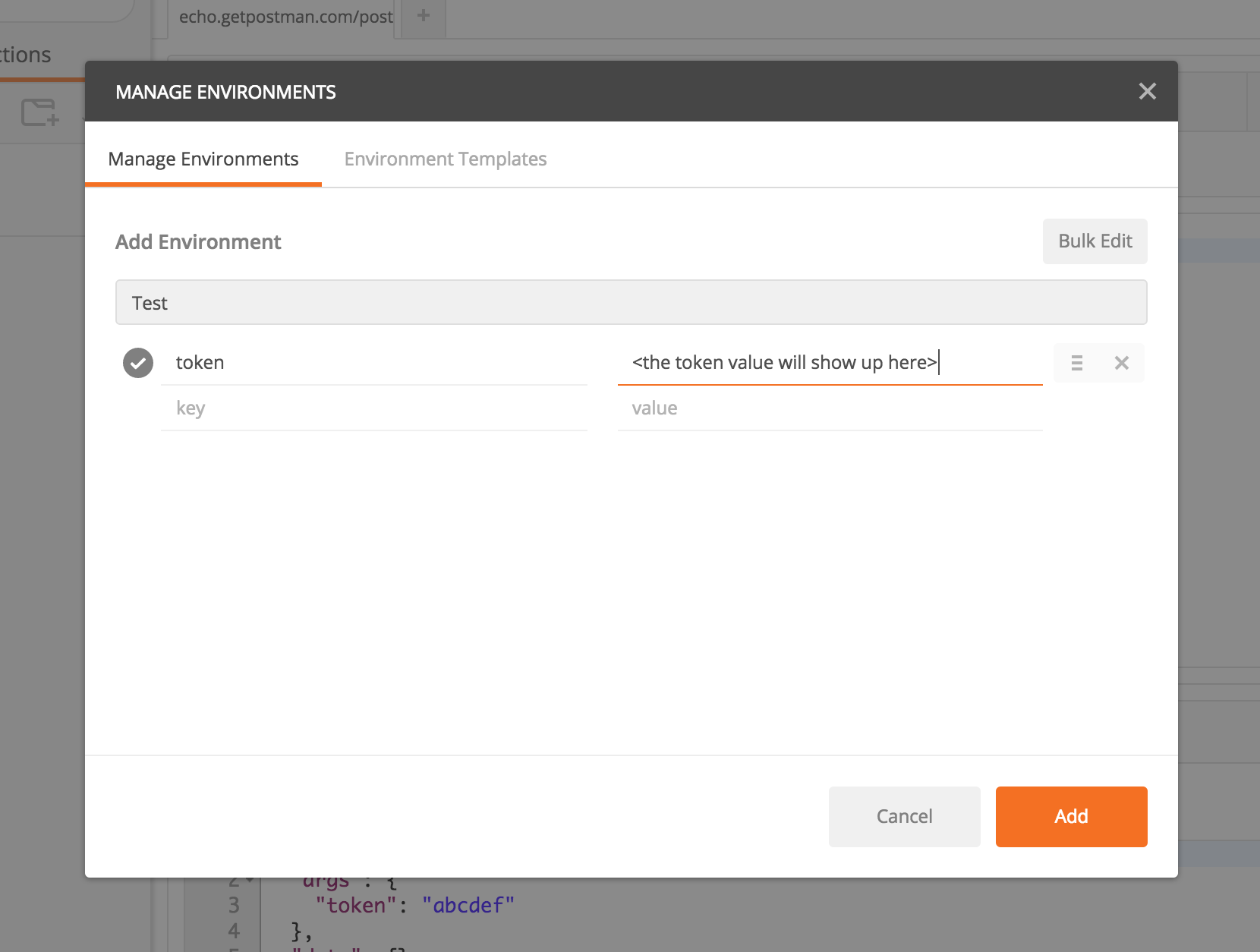
1) Sett up a new environment with variables.
2) Create environment variable to store data and allow multiple requests to access data.
3) set value for new variable and then access with next request.
// set Environment Variable
var jsonData = JSON.parse(responseBody);
postman.setEnvironmentVariable("token", jsonData.token);

// access in request body
{
   "data" : {
           "status": "my_status",
           "token": "{{token}}"
   }
}
There is another helpful blog post on this here

Explanation Of API Chaining

Creating cURL commands in Postman

To create a cURL command in Postman.

Testing in Postman

We can write tests to validate the schema returned in response and various errors that are expected.
// parse response
var jsonData = JSON.parse(responseBody);

// create schema
var schema = 
{
    "type": "object",
    "properties":  {
                    "data": {
                        "type": "object",
                        "properties": {
                                        "reservationReference": {"type": "string"}
                                        }
                            }
                    }
};

// validate schema
tests["Valid Response Schema"] = tv4.validate(jsonObject, schema);

Postman Sandbox

The Postman Sandbox is a JavaScript execution environment that is available to you while writing pre-request scripts and test scripts for requests (both in Postman and Newman). Whatever code you write in the pre-request/test script section is executed in this sandbox.

JSON Schema Validation

Tiny Validator for JSON Schema v4
JSON Schema Examples
Understanding json schemal


my thanks to this great blog post:
http://www.tjmaher.com/2016/07/introduction-to-api-testing-with.html

Host Headers in IIS

0

Category : , ,

Introduction

IIS has the ability to host multiple websites on one single server. To do this, a unique combination of the host header name, IP address and port number must exist

The host header is part of the HTTP message

The client and webserver communicates using the HTTP protocol. The data sent between the client and server is called a HTTP message (see RFC 2616, section 4). The HTTP message has a body section and a header section. The header section contains information such as Content-Length, Referer, Host (and possibly also much more). A HTTP message may not have a host header.

How the client communicates with the webserver

To understand where the HTTP message is examined, it is crucial to understand the communication between the client and server.
  1. The communication is (typically) introduced by a user typing the domain name and port number into their browser
  2. The browser will now need to resolve the domain name the user has typed into their browser because the client must establish a connection to the IP address and port number. The resolution of the domain name into an IP address can be done by utilizing a DNS server or the hosts file.
  3. Once the domain name has been resolved, the client established a connection to the webserver and then sends a request message. This request message contains the host header, and may look like: GET /index.htm HTTP/1.1
    Host: www.ilopia.com
  4. The server receives the HTTP message and examines it. If a host header is found (a HTTP message may not have a host header), IIS will find out if there is any host header name configured in IIS that matches the host header received in the HTTP message. If there is a host header name that matches the host header, index.htm will be served from this website's home folder.
  5. The last step is that IIS will respond to the request.

Name resolution is not part of IIS

As could be seen in the section "How the client communicates with the webserver" above, the HTTP message (and the host header) is not examined until a connection is established between the webserver and client. So when configuring IIS to use host headers, it is necessary to configure name resolution as well. Name resolution is not part of IIS (IIS is a web server, not a name resolution service). Instead a DNS service is necessary, or for a small network the hosts file may be sufficient.

Behind the scenes

Each website set up in IIS "binds" to an IP address, port number and host header name. Each website's configuration is stored in the metabase property ServerBindings, which has the string format IP:Port:Hostname. An example would look like 192.168.0.1:80:www.gafvert.info. The host header name (www.gafvert.info in the example) and IP (192.168.0.1 in the example) can be omitted.

To determine which website should handle a request, IIS checks if there is a website configured to listen on the IP address and port number the request came in on, and which also matches the host header value sent in the HTTP message. If it finds a website with a ServerBindings property that matches this exactly, the request is routed to that website.

If there is no website with an exact match, IIS checks if there is a website configured to listen on all IP addresses (in IIS Manager called "All Unassigned"), the port the request came in on, and with a configured host header name matching what is sent in the HTTP message. If a match is found, IIS routes the request to that website.

The last step is to see if there is any website with a blank host header configured in IIS, which will then handle the request.

my thanks to:
http://www.it-notebook.org/iis/article/understanding_host_headers.htm

C# Best Practices: Improving on the Basics

0

Category :

Null Reference Check - Null Conditional Operator

product?.Option?.Name

Nullable Types

help distinguish default and "not set" values

Static Class

Container for Utility methods logging + email

Read-only properties

set on intialisation or constructor and not changed.

Expression based Properties

using lambda operator => public string FullName => FirstName + " " + LastName;

Auto-Implemented Properties

simple properties, no additional get/set code necessary

Validate Incoming Params - "Guard clauses"

 if(product == null) throw new ArgurmentNulException(nameof(product));
Guard clauses should also be tested.
 [ExpectedException(typeof(ArgumentNullException))]

Method Chaining - Optional Params

One method overload calls another method overload to prevent repeated code.
public Result PlaceOrder(Product product, int quantity)
{
   return PlaceOrder(product, quantity, null, null);
}

public Result PlaceOrder(Product product, int quantity, DateTimeOffset? deliverBy)
{
   return PlaceOrder(product, quantity, deliverBy, null);
}

public Result PlaceOrder(Product product, int quantity, DateTimeOffset? deliverBy, string instructions)
{
   // all of code here
}

Expression-bodied Methods

Syntax shortcut for single statement methods that return a value. Avoid when:
Guard clauses are necessary.
Exception handling necessary.
public decimal CalculateSuggestedPrice(decimal markupPercent)
{
 return this.Cost + (this.Cost * markupPercent / 100);
}

public decimal CalculateSuggestedPrice(decimal markupPercent) =>
 this.Cost + (this.Cost * markupPercent / 100);


my thanks to:
https://app.pluralsight.com/library/courses/csharp-best-practices-improving-basics/table-of-contents

C# Predicate

0

Category :

Predicate is a functional construct providing a convenient way of basically testing if something is true of a given T object.

The Predicate will always return a boolean, by definition.
Predicate is basically identical to Func
List of People objects and we need to find if one is named Oscar:

Old Method

Person oscar = null;
foreach (Person person in people) {
    if (person.Name == "Oscar") {
        oscar = person;
        break;
    }
}

if (oscar != null) {
    // Oscar exists!
}
If we need to find someone with a different name then we will need a lot more code using this method.

Predicate

Using Predicates involves much less code and maybe easier to read....maybe
Predicate oscarFinder = (Person p) => { return p.Name == "Oscar"; };
Predicate ruthFinder = (Person p) => { return p.Name == "Ruth"; };
Predicate seventnYOFinder = (Person p) => { return p.Age == 17; };

Person oscar = people.Find(oscarFinder);
Person ruth = people.Find(ruthFinder);
Person seventeenYearOld = people.Find(seventnYOFinder );


my thanks to:
http://stackoverflow.com/questions/1710301/what-is-a-predicate-in-c

C# Yield

0

Category :

The following example shows the two forms of the yield statement.

1. Yield Break

You can use a yield break statement to end the iteration.

2. Yield Return expression

Return each iterator element one at a time. Each iteration of the foreach loop calls the iterator method. When a yield return statement is reached in the iterator method, expression is returned, and the current location in code is retained. Execution is restarted from that location the next time that the iterator function is called.

C# Example:

    static void Main()
    {
        // Display powers of 2 up to the exponent of 8:
        foreach (int i in Power(2, 8))
        {
            Console.Write("{0} ", i);
        }
    }

    public static IEnumerable Power(int number, int exponent)
    {
        int result = 1;

        for (int i = 0; i < exponent; i++)
        {
            result = result * number;
            yield return result;
        }
    }

    // Output: 2 4 8 16 32 64 128 256

Control flow:

1. Hits foreach
2. Enters Power method
3. Yield return result
4. Returns to outer foreach
5. Console write
6. Next loop of foreach re-enters Power method
7. Remembers previous value of "result"
8. And so oooooon......

Main Uses

Custom Iteration: No need for temp collection to store result-set that matches criteria.
Stateful Iteration: Keeping track of state during foreach

my thanks to:

https://msdn.microsoft.com/en-us/library/9k7k7cf0.aspx
https://www.youtube.com/watch?v=4fju3xcm21M

Delegates

0

Category :

Delegate is a Pointer to a function/method.

What is the benefit of calling the method indirectly via a pointer?

Dictionary def - Delegate: is a representative to communicate between two parties.

    
    class Program
    {
        static void Main(string[] args)
        {
            MyClass obj = new MyClass();
            obj.LongRunning(Callback);
        }

        static void Callback(int i)
        {
            Console.WriteLine(i);
        }
    }

    public class MyClass
    {
        public delegate void CallBack(int i);
        public void LongRunning(CallBack obj)
        {
            for (int i = 0; i < 10000; i++)
            {
                obj(i);
            }
        }
    }

Program Flow

1. Call LongRunning passing Callback method.
2. LongRunning method within MyClass is executed and executes passed in method which is now called obj but in reality it is a Pointer to the Callback method.
3. Callback method is executed on Program class, which writes the current value of i to the console.

my thanks to:
https://www.youtube.com/watch?v=ifbYA8hyvjc
http://www.codeproject.com/Articles/1061085/Delegates-Multicast-delegates-and-Events-in-Csharp