
- Take down App1
- Deploy changes to App1
- Update hosts file (C:\Windows\System32\drivers\etc) to target App1
- Update DB
- Bring App1 back up
- Test new functionality targeting App1
- Bring down App2
- Test new changes again (running only on App1 now)
- If everything is ok take down App2
- Deploy changes
- Target App2 usings hosts file and test
- Bring App2 back up
Category : API

Category : API
Basic API Authentication w/ TLS
There are no advanced options for using this protocol, so you are just sending a username and password that is Base64 encoded. Basic authentication should never be used without TLS (formerly known as SSL) encryption because the username and password combination can be easily decoded otherwise.Can be passed in either the headers or body when using SSl/TLS as both are encrypted
API Keys v’s username/password
Less secure, reused across many sites, they’re much easier to intercept, then compromised for all sites.API Keys have secrets that are securely randomly generated character strings over 40 characters long and have significantly greater entropy and are much harder for attackers to compromise.
API Keys are independent of the account’s master credentials, can be revoked and created at will – many API Keys can be granted to a single account. valuable for key rotation strategies, i.e. requiring a new key per month, or removing keys if you think one might have been compromised.
API Keys, because of their additional security (used with secure authentication schemes like digest-based authentication), allowsAPI calls to be as fast as possible – a necessity for system-to-system communication.
OAuth1.0a
most secure, signature-based protocolcryptographic signature, (usually HMAC-SHA1) value that combines the token secret, nonce, and other request based information
this level of security comes with a price: generating and validating signatures can be a complex process. You must use specific hashing algorithms with a strict set of steps.
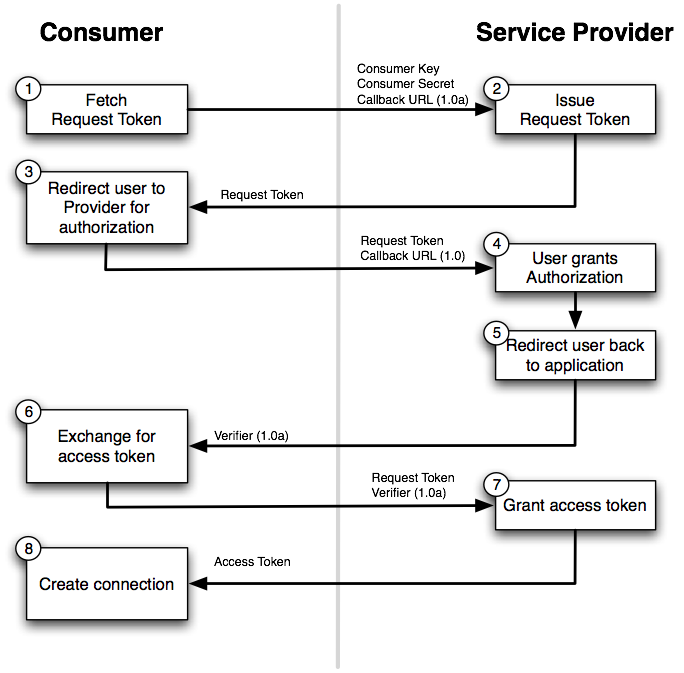
OAuth 1.0a Workflow
Based on having shared secrets between the consumer and the server that are used to calculate signatures. The latter then allow the server to verify the authenticity of API requests.This type of OAuth includes extra steps if compared to OAuth 2.0. It requires that the client ask the server for a request token. This token acts like the authorization code in OAuth 2.0 and is what gets exchanged for the access token.
OAuth 2
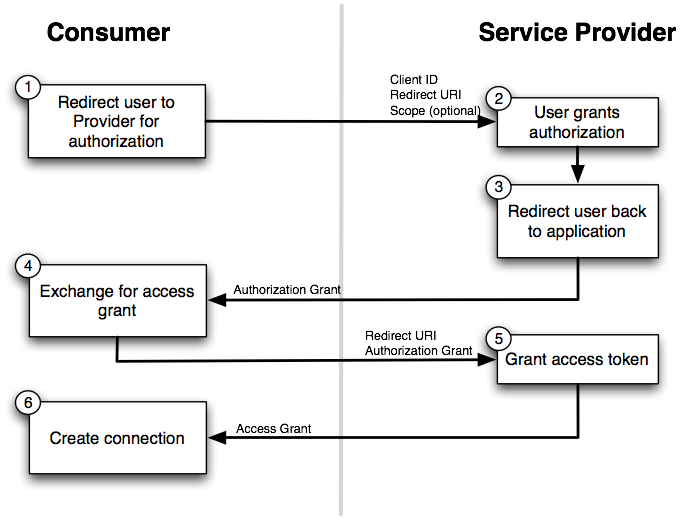
completely different take on authentication that attempts to reduce complexityOAuth3’s current specification removes signatures, so you no longer need to use cryptographic algorithms to create, generate, and validate signatures.v All the encryption is now handled by TLS, which is required
not as many OAuth3 libraries as there are OAuth2a libraries
no digital signature means you can’t verify if contents have been tampered with before or after transit
OAuth2 is recommended over OAuth3 for sensitive data applications. OAuth3 could make sense for less sensitive environments, like some social networks.
OAuth 2 Workflow
OWASP - Top 10 vulnerabilities in online services
https://www.owasp.org/index.php/Category:OWASP_Top_Ten_ProjectOWASP CheatSheets
https://www.owasp.org/index.php/REST_Security_Cheat_Sheethttps://www.owasp.org/index.php/.NET_Security_Cheat_Sheet
My thanks to: https://stormpath.com/blog/secure-your-rest-api-right-way
https://api2cart.com/api-technology/choosing-oauth-type-api/
Category : API
A well-designed API is easy to use and makes the developer’s life simple. API is the GUI for developers, if it is confusing or not verbose they will not use it.
Collections - are set of resources, e.g Companies is the collection of Company resource.
URL - (Uniform Resource Locator) is a path through which a resource can be located and some actions can be performed on it.
Another common approach to dealing with formats is instead to set the Accept and Content-Type headers to describe what format you want and what format the response is respectively
This also has some additional benefits. For example, when you want to deprecate a given version, you can now use HTTP status code 406 to indicate the API can no longer produce an acceptable format for the client.
One exception to this approach is if the API is to be accessed mostly by browsers as the user cannot easily set the headers.
my thanks to these amazing posts on the subject:
https://hackernoon.com/restful-api-designing-guidelines-the-best-practices-60e1d954e7c9
http://www.restapitutorial.com/lessons/restquicktips.html
| Rest | v | Soap |
|---|---|---|
| Things | v | Actions |
| Nouns | v | Verbs |
| Resources | v | Methods |
| Resource-Get | v | GetUserData |
Terminologies
Resource - is an object or representation of something, which has some associated data with it and there can be set of methods to operate on it. E.g. Animals, schools and employees are resources and delete, add, update are the operations to be performed on these resources.Collections - are set of resources, e.g Companies is the collection of Company resource.
URL - (Uniform Resource Locator) is a path through which a resource can be located and some actions can be performed on it.
API endpoint
Some sample API endpoints for Companies which has some Employees:/getAllEmployees is an API endpoint which will respond with the list of employees./addNewEmployee/updateEmployee/deleteEmployee/deleteAllEmployees/promoteEmployee/promoteAllEmployeesAnd lots of other similarly named enpoints for different operations. All of which will contain many redundant actions. Hence, all these API endpoints would be burdensome to maintain, when API count increases.
What is wrong?
A RESTful URL should only contain resources(nouns) not actions or verbs. The API path /addNewEmployee contains the action addNew along with the resource name Employee.
Correct way
/companies endpoint is a good example, which contains no action. So how do we tell the server about the actions to be performed on companies resource. whether to add, delete or update?
This is where the HTTP methods (GET, POST, DELETE, PUT), also called as verbs, play the role.
The resource should always be plural in the API endpoint and if we want to access one instance of the resource, we can always pass the id in the URL.
- method
GETpath/companiesshould get the list of all companies - method
GETpath/companies/34should get the detail of company 34 - method
DELETEpath/companies/34should delete company 34
In few other use cases, if we have resources under a resource, e.g Employees of a Company, then few of the sample API endpoints would be:
GET /companies/3/employeesshould get the list of all employees from company 3GET /companies/3/employees/45should get the details of employee 45, which belongs to company 3DELETE /companies/3/employees/45should delete employee 45, which belongs to company 3POST /companiesshould create a new company and return the details of the new company created
HTTP methods (verbs)
HTTP has methods which indicates the type of action to be performed on the resources.GETrequests data from the resource and should not produce any side effect./companies/3/employeesPOSTmethod requests the server to create a resource in the database, mostly when a web form is submitted./companies/3/employees
non-idempotent which means multiple requests will have different effects.PUTmethod requests the server to update resource or create the resource, if it doesn’t exist./companies/3/employees/john
idempotent which means multiple requests will have the same effectsDELETEmethod requests that the resources, or its instance, should be removed./companies/3/employees/john/
HTTP response status codes
When a caller makes a request to the API the caller needs to know if the call passed, failed or if it was an incorrect request. There are standardized HTTP codes which have various explanations in different scenarios, ideally the server should always return the most applicable code.2xx (Success category)
The requested action was received and successfully processed by the server.- 200 Ok The standard HTTP response representing success for GET, PUT or POST.
- 201 Created returned whenever the new instance is created.
- 204 No Content represents the request is successfully processed, but has not returned any content.
4xx (Client Error Category)
- 400 Bad Request indicates that the request by the client was not processed, as the server could not understand what the client is asking for.
- 401 Unauthorized indicates that the client is not allowed to access resources, and should re-request with the required credentials.
- 403 Forbidden indicates that the request is valid and the client is authenticated, but the client is not allowed access the page or resource for any reason.
5xx (Server Error Category)
- 500 Internal Server Error the request is valid, but the server is totally confused and the server is asked to serve some unexpected condition.
- 503 Service Unavailable the server is down or unavailable to receive and process the request. Mostly if the server is undergoing maintenance.
Field name casing convention
If the request body or response type is JSON then please follow camelCase to maintain the consistency.Searching, sorting, filtering and pagination
All of these actions are simply the query on one dataset.- Sorting endpoint should accept multiple sort params in the query.
GET /companies?sort=rank_ascwould sort the companies by its rank in ascending order. - Filtering we can pass various options through query params.
GET /companies?category=banking&location=indiafilter the companies list data with the company category of Banking and where the location is India. - Searching When searching the company name in companies list the API endpoint should be
GET /companies?search=Digital Mckinsey - Pagination
GET /companies?page=23get the list of companies on 23rd page.
414 URI Too long HTTP status, in those cases params can also be passed in the request body of the POST method.
Versioning
Upgrading the API with some breaking change would also lead to breaking the existing products or services using your APIs.http://api.yourservice.com/v1/companies/34/employees
Another common approach to dealing with formats is instead to set the Accept and Content-Type headers to describe what format you want and what format the response is respectively
Accept: application/json;version=2
/users/123
This also has some additional benefits. For example, when you want to deprecate a given version, you can now use HTTP status code 406 to indicate the API can no longer produce an acceptable format for the client.
One exception to this approach is if the API is to be accessed mostly by browsers as the user cannot easily set the headers.
my thanks to these amazing posts on the subject:
https://hackernoon.com/restful-api-designing-guidelines-the-best-practices-60e1d954e7c9
http://www.restapitutorial.com/lessons/restquicktips.html
Category : signalr
What is SignalR?
ASP.NET SignalR is a library for ASP.NET developers that simplifies the process of adding real-time web functionality to applications. Real-time web functionality is the ability to have server code push content to connected clients instantly as it becomes available, rather than having the server wait for a client to request new data.Examples include dashboards and monitoring applications, collaborative applications (such as simultaneous editing of documents), job progress updates, and real-time forms.
SignalR provides a simple API for creating server-to-client remote procedure calls (RPC) that call JavaScript functions in client browsers (and other client platforms) from server-side .NET code. SignalR also includes API for connection management (for instance, connect and disconnect events), and grouping connections.
SignalR handles connection management automatically, and lets you broadcast messages to all connected clients simultaneously, like a chat room.
You can also send messages to specific clients.
The connection between the client and server is persistent, unlike a classic HTTP connection, which is re-established for each communication.
SignalR applications can scale out to thousands of clients using Service Bus, SQL Server or Redis.
SignalR and WebSocket
SignalR uses the new WebSocket transport where available, and falls back to older transports where necessary. You could write your application using WebSocket directly but using SignalR means that a lot of the extra functionality you would need to implement will already have been done for you. Take advantage of WebSocket without having to worry about creating a separate code path for older clients. SignalR will continue to be updated to support changes in the underlying transports WebSocket etc, providing your application a consistent interface across versions of WebSocket.Transports and fallbacks
SignalR is an abstraction over some of the transports that are required to do real-time work between client and server. A SignalR connection starts as HTTP, and is then promoted to a WebSocket connection if it is available. WebSocket is the ideal transport for SignalR It makes the most efficient use of server memory has the lowest latency has the most underlying features (such as full duplex communication between client and server) but it also has the most stringent requirements: WebSocket requires the server to be using Windows Server 2012 or Windows 8, and .NET Framework 4.5. If these requirements are not met, SignalR will attempt to use other transports to make its connections.HTML 5 transports
These transports depend on support for HTML 5. If the client browser does not support the HTML 5 standard, older transports will be used.- WebSocket (if the both the server and browser indicate they can support Websocket). WebSocket is the only transport that establishes a true persistent, two-way connection between client and server.
- Server Sent Events, also known as EventSource (if the browser supports Server Sent Events, which is basically all browsers except Internet Explorer.)
Comet transports
The following transports are based on the Comet web application model, in which a browser or other client maintains a long-held HTTP request, which the server can use to push data to the client without the client specifically requesting it.- Forever Frame (for Internet Explorer only). Forever Frame creates a hidden IFrame which makes a request to an endpoint on the server that does not complete. The server then continually sends script to the client which is immediately executed, providing a one-way realtime connection from server to client. The connection from client to server uses a separate connection from the server to client connection, and like a standard HTML request, a new connection is created for each piece of data that needs to be sent.
- Ajax long polling. Long polling does not create a persistent connection, but instead polls the server with a request that stays open until the server responds, at which point the connection closes, and a new connection is requested immediately. This may introduce some latency while the connection resets.
Transport selection process
The following list shows the steps that SignalR uses to decide which transport to use.- If the browser is Internet Explorer 8 or earlier, Long Polling is used.
- If JSONP is configured (that is, the jsonp parameter is set to true when the connection is started), Long Polling is used.
- If a cross-domain connection is being made (that is, if the SignalR endpoint is not in the same domain as the hosting page), then WebSocket will be used if the following criteria are met:
- The client supports CORS (Cross-Origin Resource Sharing). For details on which clients support CORS, see CORS at caniuse.com.
- The client supports WebSocket
The server supports WebSocket
If any of these criteria are not met, Long Polling will be used. For more information on cross-domain connections, see How to establish a cross-domain connection.
- If JSONP is not configured and the connection is not cross-domain, WebSocket will be used if both the client and server support it.
- If either the client or server do not support WebSocket, Server Sent Events is used if it is available.
- If Server Sent Events is not available, Forever Frame is attempted.
- If Forever Frame fails, Long Polling is used.
Monitoring transports
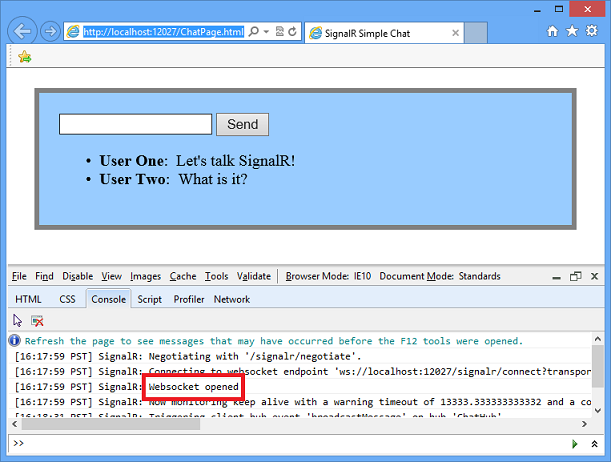
You can determine what transport your application is using by enabling logging on your hub, and opening the console window in your browser.To enable logging for your hub's events in a browser, add the following command to your client application:
$.connection.hub.logging = true;
With the console open and logging enabled, you'll be able to see which transport is being used by SignalR
Specifying a transport
Negotiating a transport takes a certain amount of time and client/server resources. If the client capabilities are known, then a transport can be specified when the client connection is started. The following code snippet demonstrates starting a connection using the Ajax Long Polling transport, as would be used if it was known that the client did not support any other protocol:
connection.start({ transport: 'longPolling' });
You can specify a fallback order if you want a client to try specific transports in order. The following code snippet demonstrates trying WebSocket, and failing that, going directly to Long Polling.
connection.start({ transport: ['webSockets','longPolling'] });
Connections and Hubs
The SignalR API contains two models for communicating between clients and servers: Persistent Connections and Hubs.A Connection represents a simple endpoint for sending single-recipient, grouped, or broadcast messages. The Persistent Connection API (represented in .NET code by the PersistentConnection class) gives the developer direct access to the low-level communication protocol that SignalR exposes.
A Hub is a more high-level pipeline built upon the Connection API that allows your client and server to call methods on each other directly. SignalR handles the dispatching across machine boundaries as if by magic, allowing clients to call methods on the server as easily as local methods, and vice versa.
Architecture diagram
he following diagram shows the relationship between Hubs, Persistent Connections, and the underlying technologies used for transports.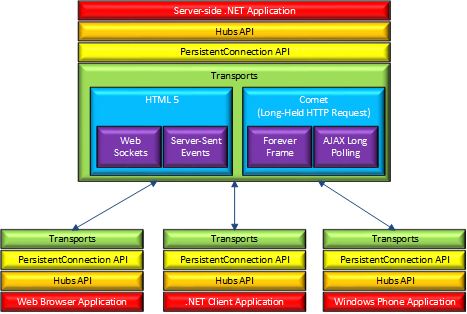
How Hubs work
When server-side code calls a method on the client, a packet is sent across the active transport that contains the name and parameters of the method to be called (when an object is sent as a method parameter, it is serialized using JSON). The client then matches the method name to methods defined in client-side code. If there is a match, the client method will be executed using the deserialized parameter data.The method call can be monitored using tools like Fiddler. The following image shows a method call sent from a SignalR server to a web browser client in the Logs pane of Fiddler. The method call is being sent from a hub called MoveShapeHub, and the method being invoked is called updateShape.
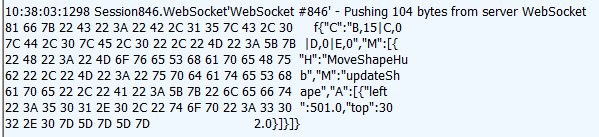
In this example, the hub name is identified with the H parameter; the method name is identified with the M parameter, and the data being sent to the method is identified with the A parameter. The application that generated this message is created in the High-Frequency Realtime tutorial.+
Choosing a communication model
Most applications should use the Hubs API. The Connections API could be used in the following circumstances:- The format of the actual message sent needs to be specified.
- The developer prefers to work with a messaging and dispatching model rather than a remote invocation model.
- An existing application that uses a messaging model is being ported to use SignalR.
my thanks to the great article here:
https://docs.microsoft.com/en-us/aspnet/signalr/overview/getting-started/introduction-to-signalr
Category : javascript
When you’re learning any new language, you write code and then you throw it away, and then you write some more. My modern JavaScript education has been a stepladder of tutorials, then a small tractable project during which I compiled a list of questions and problems, then a check-in with my coworkers to get answers and explanations, then more tutorials, then a slightly bigger project, more questions, a check-in — wash, rinse, repeat.
Here’s an incomplete list of some of the workshops and tutorials I’ve run through in this process so far.
npm install thousands of times before I started this process, I didn’t know all the things npm does till I completed this interactive workshop. (On several projects I’ve since moved onto using yarn instead of npm, but all the concepts translate.)4) Now it was time to build something real. I found Tomomi Imura’s tutorial on Creating a Slack Command Bot from Scratch with Node.js was just enough Node and Express to put my newfound skills to work. Since I was focusing on backend, building a slash command for Slack was a good place to start because there’s no frontend presentation (Slack does that for you).
5) In the process of building this command, instead of using ngrok or Heroku as recommended in the walkthrough, I experimented with Zeit Now, which is an invaluable tool for anyone building quick, one-off JS apps.
6) Once I started writing Actual Code, I also started to fall down the tooling rabbit hole. Installing Sublime plugins, getting Node versioning right, setting up ESLint using Airbnb’s style guide (Postlight’s preference) — these things slowed me down, but also were worth the initial investment. I’m still in the thick of this; for example, Webpack is still pretty mysterious to me, but this video is a pretty great introduction.
7) At some point JS’s asynchronous execution (specifically, “callback hell”) started to bite me. Promise It Won’t Hurt is another workshopper that teaches you how to write “clean” asynchronous code using Promises, a relatively new JS abstraction for dealing with async execution. Truth be told, Promises almost broke me — they’re a mind-bendy paradigm shift. Thanks to Mariko Kosaka, now I think about them whenever I order a burger.
8) From here I knew enough to get myself into all sorts of trouble, like experiment with Jest for testing, Botkit for more Slack bot fun, and Serverless to really hammer home the value of functional programming. If you don’t know what any of that means, that’s okay. It’s a big world, and we all take our own paths through it.
my thanks to this great post:https://trackchanges.postlight.com/modern-javascript-for-ancient-web-developers-58e7cae050f9
Newman is a command-line collection runner for postman.
1) So the first step is to export your collection and environment variables.
2) Save the JSON file in a location you can access with your terminal.
3) Install Newman CLI globally, then navigate to the where you saved the collection.
4) Once you are in the directory, run the below command, replacing the collection_name with the name you used to save the collection.
6) You may also want to specify the -d flag for a data file and the --insecure switch to allow calls to self signed certs.
You should see something like the below:

my thanks to the great article below.
https://scotch.io/tutorials/write-api-tests-with-postman-and-newman#newman-cli
Postman BDD allows you to use BDD syntax to structure your tests and fluent Chai-JS syntax to write assertions. So the above test suite could look like this instead:
https://github.com/BigstickCarpet/postman-bdd
Probably start at Step 2: Setup Your Jenkins Build
my thanks to the great post below:
https://www.linkedin.com/pulse/api-test-automation-ci-using-github-jenkins-slack-talal-ibdah?trk=mp-reader-card
1) So the first step is to export your collection and environment variables.
2) Save the JSON file in a location you can access with your terminal.
3) Install Newman CLI globally, then navigate to the where you saved the collection.
4) Once you are in the directory, run the below command, replacing the collection_name with the name you used to save the collection.
newman run "collection_name.json" -e GITHUB_ENV.postman_environment.json5) Ensure you add the -e flag which is for the environment param.
6) You may also want to specify the -d flag for a data file and the --insecure switch to allow calls to self signed certs.
You should see something like the below:
my thanks to the great article below.
https://scotch.io/tutorials/write-api-tests-with-postman-and-newman#newman-cli
Postman BDD allows you to use BDD syntax to structure your tests and fluent Chai-JS syntax to write assertions. So the above test suite could look like this instead:
https://github.com/BigstickCarpet/postman-bdd
API Test Automation CI using GitHub, Jenkins, and Slack
First few steps are the same as above i.e. export the postman tests and environment.Probably start at Step 2: Setup Your Jenkins Build
npm commands
Get npm installed versionnpm -versionGet npm installion directory
npm root -gGet list of installed packages
npm list -g --depth=0
my thanks to the great post below:
https://www.linkedin.com/pulse/api-test-automation-ci-using-github-jenkins-slack-talal-ibdah?trk=mp-reader-card
Category : source control
Follow the tutorial provided by Atlassian/BitBucket
Set up SSH for Git
https://confluence.atlassian.com/bitbucket/set-up-ssh-for-git-728138079.html
I encountered 2 issues:
1)
https://answers.atlassian.com/questions/331668/how-to-rectify-ssh-error-authenticity-of-host-cant-be-established
Which basically was:
"This is actually normal. It’s not actually an SSH error. What’s happening is that SSH is being cautious. That’s part of being secure. Whenever SSH tries to log in to a host it hasn’t seen before, it will put up a message like this.
SSH is saying “I haven’t seen this host before. It has this IP. It identifies itself with this fingerprint. Do you really want to connect?”
In this particular case, you don’t have any other fingerprint to compare it to. But you really are trying to connect to bitbucket.org. So you can go ahead and say “yes” and you should continue logging in."
2)
When i got to the final step to commit my test commit, I got the above error from SourceTree
I was able to complete a push to BitBucket using GitBash with no error, which to me suggested it as solely a SourceTree issue..
When i tried to use the suggested "Putty Authentication Agent" it was looking for a .ppk file which i had not generated as part of the suggested process so i presume it was looking for this type of file due to the SSH Client setting.
SourceTree-->Tools-->Options
and within the
SSH Configuration. section i changed the
SSH Client to OpenSSH, which solved the issue.
SourceTree actually located the appropriate file itself which i just confirmed.
Set up SSH for Git
https://confluence.atlassian.com/bitbucket/set-up-ssh-for-git-728138079.html
I encountered 2 issues:
1)
The authenticity of host
'bitbucket.org (131.103.20.167)' can't be established.
RSA key fingerprint is 97:8c:1b:f2:6f:14:6b:5c:3b:ec:aa:46:46:74:7c:40.
Are you sure you want to continue connecting (yes/no)?
Fix
I used the answer i found in the following questionhttps://answers.atlassian.com/questions/331668/how-to-rectify-ssh-error-authenticity-of-host-cant-be-established
Which basically was:
"This is actually normal. It’s not actually an SSH error. What’s happening is that SSH is being cautious. That’s part of being secure. Whenever SSH tries to log in to a host it hasn’t seen before, it will put up a message like this.
SSH is saying “I haven’t seen this host before. It has this IP. It identifies itself with this fingerprint. Do you really want to connect?”
In this particular case, you don’t have any other fingerprint to compare it to. But you really are trying to connect to bitbucket.org. So you can go ahead and say “yes” and you should continue logging in."
2)
"Authentication via SSH keys failed, do you want to launch
the SSH key agent and retry?"
When i got to the final step to commit my test commit, I got the above error from SourceTree
I was able to complete a push to BitBucket using GitBash with no error, which to me suggested it as solely a SourceTree issue..
When i tried to use the suggested "Putty Authentication Agent" it was looking for a .ppk file which i had not generated as part of the suggested process so i presume it was looking for this type of file due to the SSH Client setting.
Fix
To fix the issue i went toSourceTree-->Tools-->Options
and within the
SSH Configuration. section i changed the
SSH Client to OpenSSH, which solved the issue.
SourceTree actually located the appropriate file itself which i just confirmed.
Subscribe to:
Posts (Atom)