Parameter Binding in ASP.NET Web API

0

Category :

When Web API calls a method on a controller, it must set values for the parameters, a process called binding.
By default, Web API uses the following rules to bind parameters:
  1. If the parameter is a "simple" type, Web API tries to get the value from the URI. Simple types include the .NET primitive types (int, bool, double, and so forth), plus TimeSpan, DateTime, Guid, decimal, and string, plus any type with a type converter that can convert from a string. (More about type converters later.)
  2. For complex types, Web API tries to read the value from the message body, using a media-type formatter.

Internet Media Types

https://docs.microsoft.com/en-us/aspnet/web-api/overview/formats-and-model-binding/media-formatters A media type, also called a MIME type, identifies the format of a piece of data. In HTTP, media types describe the format of the message body. A media type consists of two strings, a type and a subtype. For example:
  1. text/html
  2. image/png
  3. application/json

Using [FromUri]

To force Web API to read a complex type from the URI, add the [FromUri] attribute to the parameter.

Using [FromBody]

To force Web API to read a simple type from the request body, add the [FromBody] attribute to the parameter.

At most one parameter is allowed to read from the message body. So this will not work:
// Caution: Will not work!    
public HttpResponseMessage Post([FromBody] int id, [FromBody] string name) { ... }

Type Converters

You can make Web API treat a class as a simple type (so that Web API will try to bind it from the URI) by creating a TypeConverter and providing a string conversion.

The client can invoke the method with a URI like this:
http://localhost/api/values/?location=47.678558,-122.130989

Model Binders

A more flexible option than a type converter is to create a custom model binder. With a model binder, you have access to things like the HTTP request, the action description, and the raw values from the route data.
To create a model binder, implement the IModelBinder interface. This interface defines a single method, BindModel

A model binder gets raw input values from a value provider. This design separates two distinct functions:
  1. The value provider takes the HTTP request and populates a dictionary of key-value pairs.
  2. The model binder uses this dictionary to populate the model.

Value Providers

A model binder gets values from a value provider. To write a custom value provider, implement the IValueProvider interface.

HttpParameterBinding

Model binders are a specific instance of a more general mechanism. If you look at the [ModelBinder] attribute, you will see that it derives from the abstract ParameterBindingAttribute class. This class defines a single method, GetBinding, which returns an HttpParameterBinding object:

An HttpParameterBinding is responsible for binding a parameter to a value. In the case of [ModelBinder], the attribute returns an HttpParameterBinding implementation that uses an IModelBinder to perform the actual binding. You can also implement your own HttpParameterBinding.

IActionValueBinder

The entire parameter-binding process is controlled by a pluggable service, IActionValueBinder. The default implementation of IActionValueBinder does the following:
  1. Look for a ParameterBindingAttribute on the parameter. This includes [FromBody], [FromUri], and [ModelBinder], or custom attributes. Otherwise, look in HttpConfiguration.ParameterBindingRules for a function that returns a non-null HttpParameterBinding.
  2. Otherwise, use the default rules that I described previously. If the parameter type is "simple"or has a type converter, bind from the URI. This is equivalent to putting the [FromUri] attribute on the parameter. Otherwise, try to read the parameter from the message body. This is equivalent to putting [FromBody] on the parameter.
If you wanted, you could replace the entire IActionValueBinder service with a custom implementation.

my thanks to:
https://docs.microsoft.com/en-us/aspnet/web-api/overview/formats-and-model-binding/parameter-binding-in-aspnet-web-api

Unity Lifetime Managers

0

Category : ,

Lifetime Managers in Unity Container

The unity container manages the lifetime of objects of all the dependencies that it resolves using lifetime managers.

Unity container includes different lifetime managers for different purposes. You can specify lifetime manager in RegisterType() method at the time of registering type-mapping.

Lifetime Manager Description
TransientLifetimeManager When no lifetime manager is defined, unity defaults to Transient.
Creates a new object of requested type every time you call Resolve or ResolveAll method.
ContainerControlledLifetimeManager Creates a singleton object first time you call Resolve or ResolveAll method and then returns the same object on subsequent Resolve or ResolveAll call.
HierarchicalLifetimeManager Same as ContainerControlledLifetimeManager, the only difference is that child container can create its own singleton object. Parent and child container do not share singleton object.
PerResolveLifetimeManager Similar to TransientLifetimeManager but it reuses the same object of registered type in the recursive object graph.
PerThreadLifetimeManager Creates singleton object per thread basis. It returns different objects from the container on different threads.
ExternallyControlledLifetimeManager It manintains only weak reference of objects it creates when you call Resolve or ResolveAll method. It does not maintain the lifetime of strong objects it creates and allow you or garbage collector to control the lifetime. It enables you to create your own custom lifetime manager


my thanks to:
http://www.tutorialsteacher.com/ioc/lifetime-manager-in-unity-container

Handle errors in Web API

0

Category :

Using HttpResponseException

You can use the HttpResponseException class to return specific HTTP status code and messages from your controller methods in Web API.

var response = new HttpResponseMessage(HttpStatusCode.NotFound)
{
 Content = new StringContent("Employee doesn't exist", System.Text.Encoding.UTF8, "text/plain"),
 StatusCode = HttpStatusCode.NotFound
}
throw new HttpResponseException(response); 

Using HttpError

You can use the CreateErrorResponse extension method in your Web API controller method to return meaningful error codes and error messages. The CreateErrorResponse method creates an HttpError object and then wraps it inside an HttpResponseMessage object.

string message = "Employee doesn't exist";
throw new HttpResponseException(Request.CreateErrorResponse(HttpStatusCode.NotFound, message)); 

Using Exception filters

Exception filters are filters that can be used to handle unhandled exceptions that are generated in your Web API controller methods. global error filter is a good approach to handle exceptions in your Web API if unhandled exceptions are thrown and not handled in your controller methods.

To create an exception filter you need to implement the IExceptionFilter interface. You can also create exception filters by extending the abstract class ExceptionFilterAttribute and then overriding the OnException method. Note that the ExceptionFilterAttribute abstract class in turn implements the IExceptionFilter interface.

how you can create a custom exception filter by extending the ExceptionFilterAttribute class and then overriding the OnException method.
public class CustomExceptionFilter : ExceptionFilterAttribute
    {
        public override void OnException(HttpActionExecutedContext actionExecutedContext)
        {
            HttpStatusCode status = HttpStatusCode.InternalServerError;

            String message = String.Empty;
            var exceptionType = actionExecutedContext.Exception.GetType();

            if (exceptionType == typeof(UnauthorizedAccessException))
            {
                message = "Access to the Web API is not authorized.";
                status = HttpStatusCode.Unauthorized;
            }
            else if (exceptionType == typeof(DivideByZeroException))
            {
                message = "Internal Server Error.";
                status = HttpStatusCode.InternalServerError;
            }
            else if (exceptionType == typeof(InternalApiException))
            {
                message = "Internal Server Api Exception.";
                status = HttpStatusCode.InternalServerError;
            }
            else
            {
                message = "Not found.";
                status = HttpStatusCode.NotFound;
            }

            actionExecutedContext.Response = new HttpResponseMessage()
            {
                Content = new StringContent(message, System.Text.Encoding.UTF8, "text/plain"),
                StatusCode = status
            };

            base.OnException(actionExecutedContext);
        }
    }
You should add the custom exception filter to the filters collection of the HttpConfiguration object.
public static void Register(HttpConfiguration config)
{ 
 config.Filters.Add(new CustomExceptionFilter());
You can register your exception filters in one of the following three ways: At the action level
public class EmployeesController : ApiController
{
    [NotImplementedExceptionFilter]
    public Employee GetEmployee(int id) 
At the controller level
[DatabaseExceptionFilter]
public class EmployeesController : ApiController
{ 
Globally
GlobalConfiguration.Configuration.Filters.Add(new DBFilterAttribute());


my thanks to this great article:
https://www.infoworld.com/article/2994111/application-architecture/how-to-handle-errors-in-web-api.html

Dependency Injection in ASP.NET Web API 2

0

Category : ,

When trying to use Dependency Injection with Web API 2 I encountered a problem because the application doesn't create the controller directly. Web API creates the controller when it routes the request, and Web API doesn't know anything about your dependencies ie AppLogger

So basically your dependencies will not be initialised on creation of the controller.

This is where the Web API dependency resolver comes in.

The Web API Dependency Resolver

Web API defines the IDependencyResolver interface for resolving dependencies.
public interface IDependencyResolver : IDependencyScope, IDisposable
{
    IDependencyScope BeginScope();
}

public interface IDependencyScope : IDisposable
{
    object GetService(Type serviceType);
    IEnumerable<>object<> GetServices(Type serviceType);
}
The IDependencyResolver method inherits IDependencyScope and adds the BeginScope method.

So basically the minimum requirement is that the 3 of these methods are implemented.

When Web API creates a controller instance, it first calls IDependencyResolver.GetService, passing in the controller type. You can use this extensibility hook to create the controller, resolving any dependencies. If GetService returns null, Web API looks for a parameterless constructor on the controller class.

Dependency Resolution with the Unity Container

The interface is really designed to act as bridge between Web API and existing IoC containers.

Here is an implementation of IDependencyResolver that wraps a Unity container.
using Microsoft.Practices.Unity;
using System;
using System.Collections.Generic;
using System.Web.Http.Dependencies;

public class UnityResolver : IDependencyResolver
{
    protected IUnityContainer container;

    public UnityResolver(IUnityContainer container)
    {
        if (container == null)
        {
            throw new ArgumentNullException("container");
        }
        this.container = container;
    }

    public object GetService(Type serviceType)
    {
        try
        {
            return container.Resolve(serviceType);
        }
        catch (ResolutionFailedException)
        {
            return null;
        }
    }

    public IEnumerable GetServices(Type serviceType)
    {
        try
        {
            return container.ResolveAll(serviceType);
        }
        catch (ResolutionFailedException)
        {
            return new List();
        }
    }

    public IDependencyScope BeginScope()
    {
        var child = container.CreateChildContainer();
        return new UnityResolver(child);
    }

    public void Dispose()
    {
        Dispose(true);
    }

    protected virtual void Dispose(bool disposing)
    {
        container.Dispose();
    }
}
// rubbish closeout IEnumerable object list above...seen as open html tags by syntax highlighter


Configuring the Dependency Resolver

Set the dependency resolver on the DependencyResolver property of the global HttpConfiguration object.

public static void Register(HttpConfiguration config)
{
    var container = new UnityContainer();
    container.RegisterType(new HierarchicalLifetimeManager());
    config.DependencyResolver = new UnityResolver(container);

    // Other Web API configuration not shown.
}


Dependency Scope and Controller Lifetime

Controllers are created per request. To manage object lifetimes, IDependencyResolver uses the concept of a scope.

The dependency resolver attached to the HttpConfiguration object has global scope. When Web API creates a controller, it calls BeginScope. This method returns an IDependencyScope that represents a child scope.

Web API then calls GetService on the child scope to create the controller. When request is complete, Web API calls Dispose on the child scope. Use the Dispose method to dispose of the controller's dependencies.

How you implement BeginScope depends on the IoC container. For Unity, scope corresponds to a child container:
public IDependencyScope BeginScope()
{
    var child = container.CreateChildContainer();
    return new UnityResolver(child);
}


my thanks to this great article:
https://docs.microsoft.com/en-us/aspnet/web-api/overview/advanced/dependency-injection

WebApi Mvc Routing

0

Category :

Routing

Is how Web API matches a URI to an action. Web API 2 introduces attribute routing, which uses attributes to define routes, giving you more control over the URIs in your web API. convention-based routing you can combine both techniques in the same project.

HTTP Methods

Web API also selects actions based on the HTTP method of the request (GET, POST, etc). By default, Web API looks for a case-insensitive match with the start of the controller method name. For example, a controller method named PutCustomers matches an HTTP PUT request.

You can override this convention by decorating the mathod with any the following attributes
[HttpDelete] [HttpGet] [HttpHead] [HttpOptions] [HttpPatch] [HttpPost] [HttpPut]

Route Prefixes

You can set a common prefix for an entire controller by using the [RoutePrefix] attribute:

[RoutePrefix("api/books")]
public class BooksController : ApiController
{
    // GET api/books
    [Route("")]
    public IEnumerable Get() { ... }

    // GET api/books/5
    [Route("{id:int}")]
    public Book Get(int id) { ... }

    // POST api/books
    [Route("")]
    public HttpResponseMessage Post(Book book) { ... }
}
Use a tilde (~) on the method attribute to override the route prefix.
[Route("~/api/authors/{authorId:int}/books")]

Route Constraints

Route constraints let you restrict how the parameters in the route template are matched. The general syntax is "{parameter:constraint}"

[Route("users/{id:int}"]
public User GetUserById(int id) { ... }

Optional URI Parameters and Default Values

You can make a URI parameter optional by adding a question mark to the route parameter. If a route parameter is optional, you must define a default value for the method parameter or in the template.

[Route("api/books/locale/{lcid:int?}")]
public IEnumerable GetBooksByLocale(int lcid = 1033) { ... }

[Route("api/books/locale/{lcid:int=1033}")]
public IEnumerable GetBooksByLocale(int lcid) { ... }

Route Names

every route has a name. Route names are useful for generating links, so that you can include a link in an HTTP response. To specify the route name, set the Name property on the attribute.

[Route("api/books/{id}", Name="GetBookById")]
public BookDto GetBook(int id) 
{
 // Implementation not shown...
}

// Generate a link to the new book and set the Location header in the response.
string uri = Url.Link("GetBookById", new { id = book.BookId });

Route Order

When the framework tries to match a URI with a route, it evaluates the routes in a particular order. To specify the order, set the RouteOrder property on the route attribute. Lower values are evaluated first. The default order value is zero.
The order can be found on the reference page.

my thanks to:
https://docs.microsoft.com/en-us/aspnet/web-api/overview/web-api-routing-and-actions/attribute-routing-in-web-api-2

API Deployment Workflow

0

Category :

  1. Take down App1
  2. Deploy changes to App1
  3. Update hosts file (C:\Windows\System32\drivers\etc) to target App1
  4. Update DB
  5. Bring App1 back up
  6. Test new functionality targeting App1
  7. Bring down App2
  8. Test new changes again (running only on App1 now)
  9. If everything is ok take down App2
  10. Deploy changes
  11. Target App2 usings hosts file and test
  12. Bring App2 back up

API Authentication

0

Category :

Basic API Authentication w/ TLS

There are no advanced options for using this protocol, so you are just sending a username and password that is Base64 encoded. Basic authentication should never be used without TLS (formerly known as SSL) encryption because the username and password combination can be easily decoded otherwise.

Can be passed in either the headers or body when using SSl/TLS as both are encrypted

API Keys v’s username/password

Less secure, reused across many sites, they’re much easier to intercept, then compromised for all sites.

API Keys have secrets that are securely randomly generated character strings over 40 characters long and have significantly greater entropy and are much harder for attackers to compromise.

API Keys are independent of the account’s master credentials, can be revoked and created at will – many API Keys can be granted to a single account. valuable for key rotation strategies, i.e. requiring a new key per month, or removing keys if you think one might have been compromised.

API Keys, because of their additional security (used with secure authentication schemes like digest-based authentication), allowsAPI calls to be as fast as possible – a necessity for system-to-system communication.

OAuth1.0a

most secure, signature-based protocol

cryptographic signature, (usually HMAC-SHA1) value that combines the token secret, nonce, and other request based information

this level of security comes with a price: generating and validating signatures can be a complex process. You must use specific hashing algorithms with a strict set of steps.

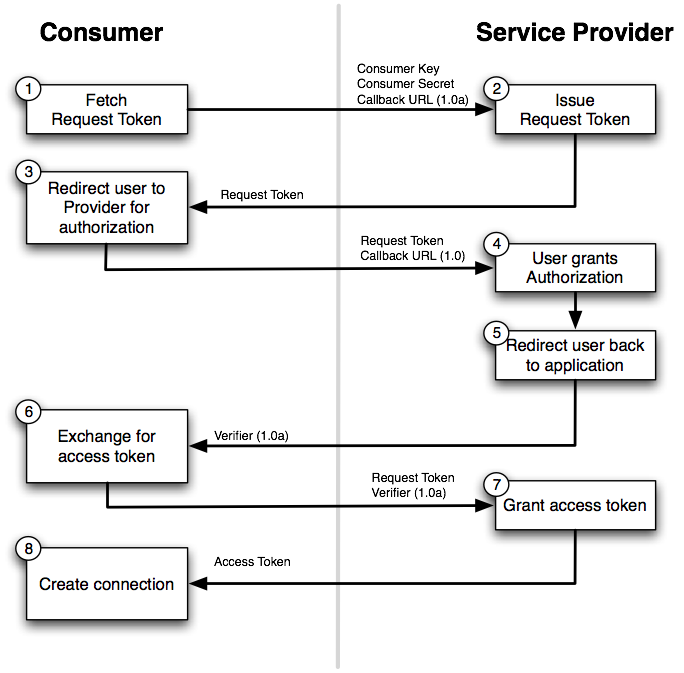
OAuth 1.0a Workflow

Based on having shared secrets between the consumer and the server that are used to calculate signatures. The latter then allow the server to verify the authenticity of API requests.

This type of OAuth includes extra steps if compared to OAuth 2.0. It requires that the client ask the server for a request token. This token acts like the authorization code in OAuth 2.0 and is what gets exchanged for the access token.

OAuth 2

completely different take on authentication that attempts to reduce complexity

OAuth3’s current specification removes signatures, so you no longer need to use cryptographic algorithms to create, generate, and validate signatures.v All the encryption is now handled by TLS, which is required

not as many OAuth3 libraries as there are OAuth2a libraries

no digital signature means you can’t verify if contents have been tampered with before or after transit

OAuth2 is recommended over OAuth3 for sensitive data applications. OAuth3 could make sense for less sensitive environments, like some social networks.

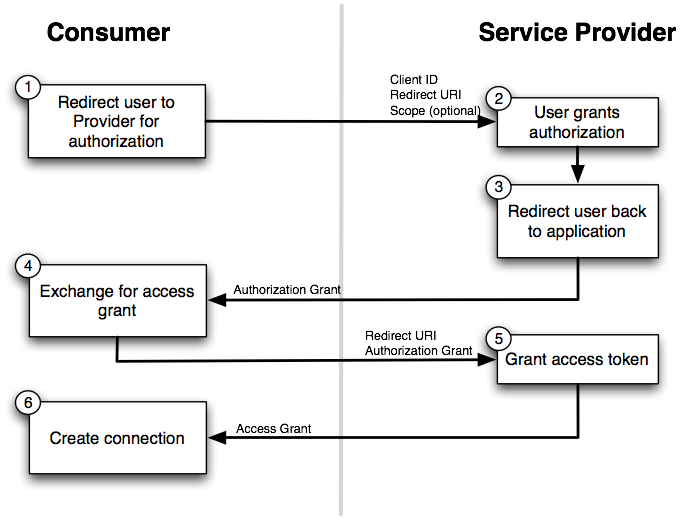
OAuth 2 Workflow

OWASP - Top 10 vulnerabilities in online services

https://www.owasp.org/index.php/Category:OWASP_Top_Ten_Project

OWASP CheatSheets

https://www.owasp.org/index.php/REST_Security_Cheat_Sheet
https://www.owasp.org/index.php/.NET_Security_Cheat_Sheet


My thanks to: https://stormpath.com/blog/secure-your-rest-api-right-way
https://api2cart.com/api-technology/choosing-oauth-type-api/